


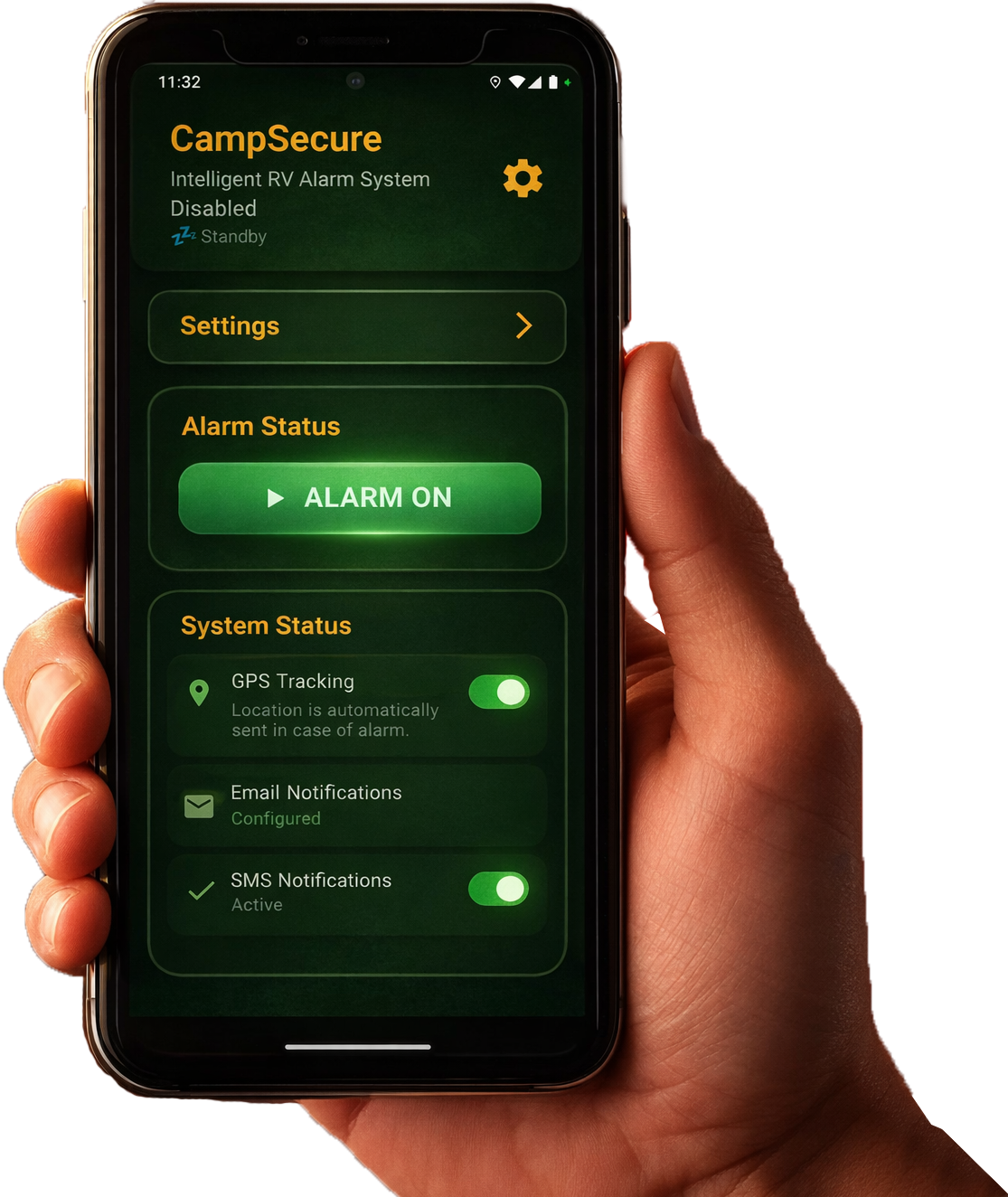
Why motorhomes are popular targets for thieves
A motorhome is part vehicle, part holiday home — and that’s exactly what makes it interesting to thieves. Inside you’ll typically find high-value gear: lithium batteries, solar tech, an inverter, bicycles, e-bikes, laptops, drones, camera kit and personal belongings. Add the residual value of the vehicle itself and a single break-in can cost an owner thousands. On top of that, motorhomes are usually parked in places where the owner can’t keep a constant eye on them: an unguarded pitch, a holiday park abroad, a winter storage lot, or simply a driveway during a long working day.
A traditional motorhome alarm system usually reacts to doors being opened or windows being forced. It rarely says anything when the vehicle is quietly towed away. That’s exactly where a software-based alarm earns its keep: CampSecure™ also watches motion, sound and orientation — and alerts you the moment something feels off, even if no door or window has been touched.
Typical theft scenarios for a motorhome
- Forced entry through a door or external locker — common in the early morning hours on open pitches.
- Towing the entire vehicle — the motorhome simply rolls away on a recovery truck.
- Interior break-in while you’re away — at the beach, on a day trip, in the bar at the holiday park.
- Opportunistic theft on a busy campsite — neighbouring campers assume the activity is normal.
Different types of motorhome alarm systems
Search for a “motorhome alarm system” online and you’ll find a confusing mix of products. To make it easier to compare, here are the three main categories side by side:
1. Hard-wired factory and dealer-fit alarm systems
A traditional control unit, siren and door/locker sensors — often combined with internal motion detectors and a GPS tracker. Usually fitted by a specialist and wired into the vehicle electrics. Pros: well-known, loud sirens, robust. Cons: high price tag, installation downtime, limited firmware updates and rarely any photo evidence when the alarm fires.
2. Wireless aftermarket alarm kits
Wireless sensors for doors, lockers and motion, often paired with a base station. Cheaper than dealer-fit systems and easier to retrofit, but most kits still don’t include a camera or live GPS. To keep an eye on the motorhome remotely you usually have to add a separate tracker and another app.
3. Smartphone-based alarm app (CampSecure™)
A dedicated Android phone becomes the alarm hub — see also our guide old phone as alarm system. Sensors, camera, GPS and mobile connection are already built in. The app evaluates motion, sound and orientation locally and sends an email with a photo and GPS position when something triggers. No specialist hardware, no installer, fully updatable through Google Play and very low monthly cost. The trade-off: there’s no loud external siren — instead you get a quiet, smart, evidence-rich alert system.
Hardware alarm vs. smartphone alarm app
The interesting question isn’t “hardware or software?” but “what does each one actually do in the real world?”. Here’s how a typical built-in motorhome alarm compares to CampSecure™ on the points motorhome owners care about most:
| Criterion | Built-in alarm system | CampSecure™ (app) |
|---|---|---|
| Upfront cost | Several hundred to well over €1,000 plus fitting | €0 — an old Android phone is enough |
| Ongoing cost | Optional service / tracker SIM | €3.99 / month, cancel any time Try 7 days free, then €3.99 / month. Cancel anytime. |
| Photo evidence on alarm | Rarely included as standard | Yes — photo attached to every alarm email |
| GPS location in alert | With an add-on tracker | Standard (one-shot GPS on each alarm) |
| Motion detection | Internal motion sensor possible | Accelerometer + gyroscope, sensitivity 0–10 |
| Sound detection | Rare | Microphone-based, sensitivity 1–10 |
| Updatable | Hardware stays as it is | Yes — over-the-air via Google Play |
| Sustainability | New electronics manufactured | Re-uses a phone you already own |
It’s worth saying clearly: an app-based alarm is not a competitor to mechanical security. The strongest setup combines physical locks (steering wheel lock, additional door/locker locks, hitch lock for trailers) with smart monitoring like CampSecure™. The combination raises the “effort vs. reward” ratio for thieves to the point where most simply move on.
Key benefits of the CampSecure™ motorhome alarm system
CampSecure™ has been designed specifically for campers and motorhome owners. The app uses any Android phone from version 10 onwards and combines the key building blocks of a modern motorhome alarm system in a single application.
Monitoring motion and vehicle orientation
Your phone’s accelerometer and gyroscope detect even subtle vibrations and tilts. Motion sensitivity is adjustable on a 0–10 scale: 0 enables “house mode” and disables motion alerts completely — ideal when the phone is mounted inside the motorhome and you only want sound monitoring. 1–10 activates vehicle mode, with 5 as a balanced default.
Sound detection for attempted break-ins
The microphone listens to the ambient soundscape. If sound rises above the configured threshold (1–10, default 5), the alarm triggers — useful even when motion alone wouldn’t catch a slow, careful pry attempt on a door or locker.
Email alert with photo and GPS location
When an alarm triggers, CampSecure™ sends an email containing:
- A fresh photo from the selected camera (front or rear).
- GPS coordinates plus a direct Google Maps link.
- The battery level and device name of the alarm phone.
- A timestamp for the event.
You see immediately what happened and where the motorhome is right now — no cloud dashboard, no extra app, just an email in your existing inbox.
Daily status report
Even when nothing happens, CampSecure™ can send a daily report at a time you choose (hour and minute, default 08:00). You receive a current interior or exterior photo, the GPS location and the battery level — a quiet daily “everything is fine” signal, especially valuable for vehicles in long-term storage.
Remote control by email
While the alarm is armed, the app checks your inbox roughly every 15 minutes. You can request a status
report (##status##) or disarm the alarm (##aus## / ##off##) from
anywhere — no need to open an app or be near the motorhome. The required email subject keyword and PIN
handling are explained in section 6 of the user guide.
Local processing — no cloud lock-in
All sensor and photo data is processed locally on the phone. There is no mandatory cloud, no third-party server. Alerts are sent through your own email account, which makes the solution transparent and privacy-friendly. See our privacy policy for more details.
Common mistakes when using a motorhome alarm system
Any motorhome alarm system is only as good as its configuration. Based on feedback from our community, these are the most frequent pitfalls:
1. Sensitivity set too high
Leaving motion sensitivity at 10 during a stormy night on an exposed pitch means every gust of wind becomes an alarm email. Recommended values: 1–3 in wind and rain, 5 as a default, 7–10 only on busy parking areas with a higher theft risk.
2. Battery optimisation left on
Many manufacturers (Xiaomi, Huawei, OnePlus, Samsung) aggressively kill background apps. For reliable operation, it’s strongly recommended to set CampSecure™ to “Not optimised” in the battery optimisation settings. The app provides a shortcut to that screen in Expert mode.
3. Extra “battery saver” apps installed
Task killers and optimisation tools sound helpful but often shut down the very services the alarm relies on. A dedicated alarm phone should run as little software as possible: just the operating system and CampSecure™.
4. No proper power supply planned
A phone left in a drawer dies within a few days. Wire it up to the leisure battery, a USB power station or a USB outlet with deep-discharge protection. When the phone’s battery level drops below the configured threshold (5–50 %, default 30 %) CampSecure™ sends a warning email so you can act in time.
5. Forgetting the required “CampSecure” subject keyword
To make sure spam can’t trigger remote commands, the app only acts on emails whose subject contains the word
CampSecure. People who skip that during testing wonder why their ##status## command
is ignored. Full details in section 6 of the user guide.
6. Treating the alarm system as a sole defence
An app can detect, document and deter — but it can’t physically hold a door shut. A smart alarm only reaches its full potential together with good mechanical security. More on this in our Motorhome Theft Protection guide.
Set up your motorhome alarm system in 10 minutes
Install the app, repurpose an old Android phone, protect your motorhome — no dealer, no installer, no long contract.
How to set up CampSecure™ as a motorhome alarm system
For most motorhome owners the entire setup takes less time than making a cup of coffee. A detailed step-by-step walkthrough is in the user guide, section 2 — here is the short version:
- Install the app: get CampSecure™ from Google Play on any Android phone running Android 10 or newer, at least 3 GB RAM.
- Grant permissions: camera, microphone, location and notifications.
- Wait for the device check: the dashboard shows whether the phone is ready. Continue only when the status is green: “System ready”.
- Disable battery optimisation: tap “Open battery optimisation” in Expert mode and set CampSecure™ to “Not optimised”.
- Configure email: enter your email provider’s SMTP details and, optionally, IMAP for remote control.
- Adjust sensitivity: set motion and sound sensitivity to fit your situation; pick a suitable alarm delay.
- Secure the motorhome and arm the alarm: plug the phone into the leisure power, close all doors and lockers, hit “Arm" — that’s it.
FAQ — Motorhome alarm system
##status##)
to request a fresh status report with photo and current location at any time.
Protect your motorhome with CampSecure™
Install the app, repurpose an old Android phone and secure your motorhome. CampSecure™ is your smart motorhome alarm system — discreet, updatable and sustainable.
Disclaimer: CampSecure™ helps you monitor your property and alerts you to suspicious events. As with any technical solution, power supply, mobile signal, internet connection or device settings may affect operation. No guarantee can be given for the detection, triggering or delivery of every individual alarm.